> For the complete documentation index, see [llms.txt](https://help.proxidize.com/llms.txt). Markdown versions of documentation pages are available by appending `.md` to page URLs; this page is available as [Markdown](https://help.proxidize.com/account-and-billing/verification/how-to-complete-kyc-verification.md).
# How to Complete KYC Verification
Complete required KYC verification to activate your Proxidize proxy access.
## How to Complete KYC Verification
KYC verification is what turns your subscription into working proxies.
It has two parts: telling us where you will use the proxies and why, then confirming your identity with a government-issued document.
Open your verification settings
### Before you start
You need an **active plan**, since verification cannot begin without one.
Make sure you have:
* access to the Proxidize account tied to your subscription
* a device camera for document and selfie capture
* the list of domains you plan to use your proxies on
* about ten minutes
#### Which document you can use
Use a valid government-issued photo ID.
You also need your current country of residence.
| Your country of residence | Accepted documents |
| ------------------------------------------------------------------------------------------------------------------------------------------------- | ----------------------------------------------------------------- |
| The European Union, plus Australia, Brazil, Canada, Japan, New Zealand, Norway, Singapore, Switzerland, the United Kingdom, and the United States | Passport, national ID card, driver's license, or residence permit |
| Any other supported country | Passport only |
Countries where a national ID card, driver's license or residence permit is also accepted
Australia, Austria, Belgium, Brazil, Bulgaria, Canada, Croatia, Cyprus, Czech Republic, Denmark, Estonia, Finland, France, Germany, Greece, Hungary, Ireland, Italy, Japan, Latvia, Lithuania, Luxembourg, Malta, Netherlands, New Zealand, Norway, Poland, Portugal, Romania, Singapore, Slovakia, Slovenia, Spain, Sweden, Switzerland, United Kingdom, United States.
{% hint style="warning" %}
**KYC is unavailable** for residents of Afghanistan, Belarus, China, Cuba, Hong Kong, Iran, Macau, North Korea, Russia, Syria, and Venezuela.
{% endhint %}
***
### Part 1: Tell us where you will use your proxies
Open **Settings → Verification** and fill in **Verification details**.
**TARGET DOMAINS** takes one domain at a time.
Type a domain and press Enter, then add the next.
You can also paste a whole list at once, using commas, spaces, semicolons, one domain per line, or a column copied from a spreadsheet.
List every domain you intend to access.
**WHY THESE DOMAINS?** is where you explain your use case.
Your verification is reviewed against this answer, so describe what you actually plan to do, on which domains, and for what purpose.
{% hint style="warning" %}
**Incomplete answers lead to accounts being suspended.**
A single vague sentence is not enough. Say what your work is, what data or pages you need, and why those specific domains.
{% endhint %}
***
### Part 2: Verify your identity
{% stepper %}
{% step %}
#### Start verification
{% tabs %}
{% tab title="From Settings" %}
On **Settings → Verification**, the **Know Your Customer** card shows your current status.
Press **Verify**.
{% endtab %}
{% tab title="From your proxies" %}
Opening your proxies before you are verified shows a prompt.
Press **Verify identity** on the **Know Your Customer** card.
{% endtab %}
{% endtabs %}
{% endstep %}
{% step %}
#### Read the timing note, then continue
You have **30 minutes** from the moment verification begins.
If time runs out you can simply start again.
Continuing takes you to our verification partner's website, so expect to leave app.proxidize.com.
{% endstep %}
{% step %}
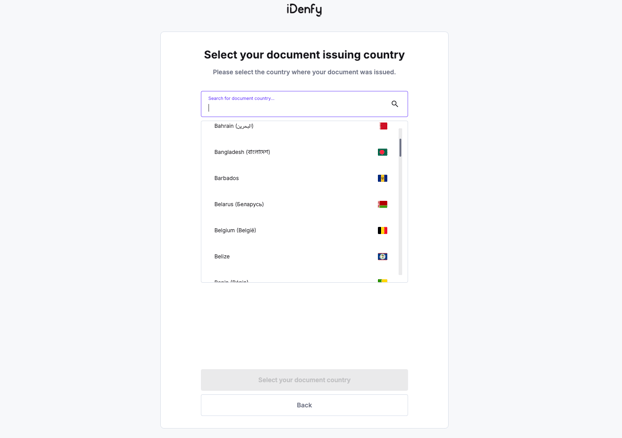
#### Choose your country and document
Select the country where you currently live, then choose a document accepted for that country.
{% endstep %}
{% step %}
#### Capture your document and a selfie
Follow the prompts to photograph or scan your document, then complete the selfie check.
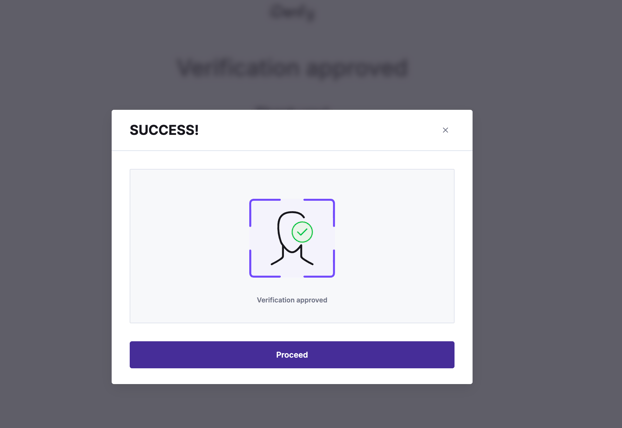
The partner confirms when your submission is complete.
{% endstep %}
{% step %}
#### Wait for the review
There is a short review after you submit.
Return to **Settings → Verification** to see your status change.
{% endstep %}
{% endstepper %}
***
### Verification statuses
The **Know Your Customer** card shows where you are.
| Status | What it means |
| ---------------- | --------------------------------------------------------------------------------------------- |
| **Not Started** | You have not begun. Press **Verify** |
| **Under Review** | Your submission is being reviewed. Your proxies stay locked until the review is done |
| **Verified** | Approved. Your proxies will carry traffic |
| **Rejected** | The provider could not approve your submission. Please contact support for next instructions. |
| **Expired** | You did not finish inside the 30 minute window. Start again |
***
### Tips for a clean submission
* Use a well lit room and a clean, uncreased document, and make sure the whole document is inside the frame.
* Check that the document is valid and unexpired, and that the country you selected matches the country that issued it.
* If verification fails, contact support.
***
### Quick FAQ
Can I verify before I buy a plan?
No.
Verification needs an active subscription, so subscribe first.
The 30 minutes ran out. Have I lost anything?
No.
The attempt expires and you start again from **Settings → Verification**.
Can I use a photo of my ID that I already have?
No.
The check is done live by our verification partner and includes a selfie, so it has to be completed on a device with a camera.
Do I need to redo this if I add another domain later?
Update **Verification details** so your listed domains stay accurate.
Your identity check does not need repeating.
***
### Related articles
* [Verification](/account-and-billing/verification.md)
* [How to Complete KYB Verification](/account-and-billing/verification/how-to-complete-kyb-verification.md)
* [How to Subscribe to a Proxidize Plan](/account-and-billing/billing-and-subscriptions/how-to-subscribe-to-a-proxidize-plan.md)
***
### Need help?
If you have any questions, concerns, or need further clarification, feel free to reach out to us via live chat or email us directly at .
---
# Agent Instructions
This documentation is published with GitBook. GitBook is the documentation platform designed so that both humans and AI agents can read, navigate, and reason over technical content effectively. Learn more at gitbook.com.
## Querying This Documentation
If you need additional information that is not directly available in this page, you can query the documentation by asking a question.
Perform an HTTP GET request on the following URL with the `ask` and `goal` query parameters:
```
GET https://help.proxidize.com/account-and-billing/verification/how-to-complete-kyc-verification.md?ask=&goal=
```
`ask` is the immediate question: it should be specific, self-contained, and written in natural language.
`goal` is what the user is ultimately trying to achieve, the reason they need the answer. Sharing it helps GitBook give you a better, more relevant answer. A goal is most helpful when it describes the outcome the user wants rather than restating the question. For example, with `ask=how do I create an API token`, a goal like `automate deployments from our CI pipeline` lets GitBook tailor the answer to that use case.
The response will contain a direct answer to the question and relevant excerpts and sources from the documentation.
Use this mechanism when the answer is not explicitly present in the current page, you need clarification or additional context, or you want to retrieve related documentation sections.