
Overview
With Sub-Accounts, you can:
- Allow multiple team members to access and manage proxies
- Maintain accountability by assigning access via individual email addresses
- Improve operational workflows (e.g., proxy monitoring, alerting)
- Enable email-based alerting for Proxy Builder setups
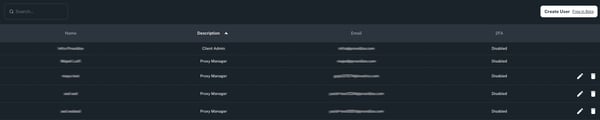
Permissions & Limitations
Role Access
- All Sub-Users are assigned the role “Proxy Manager”
- This role provides full access to the dashboard and proxies, similar to the account owner
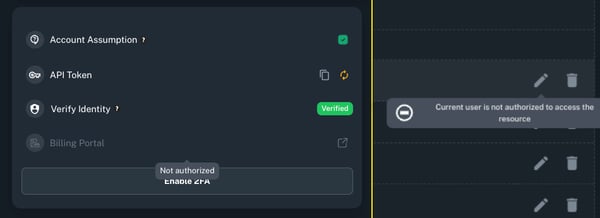
Restrictions
Sub-Users cannot:
- Access the billing portal
- Add or remove other sub-users
Important Requirement
Before creating a Sub-User:
- The email address must not have been previously used to create a Proxidize account
- If the user has already signed up before, They must delete their existing account first. For assistance, contact Proxidize Support.
How to Create a Sub-User
Follow these steps using the Admin (main) account:
Step 1: Navigate to Account Settings
- Log in to your Proxidize dashboard.
- Go to Account Settings by clicking on the Profile Icon on the top right of your screen.
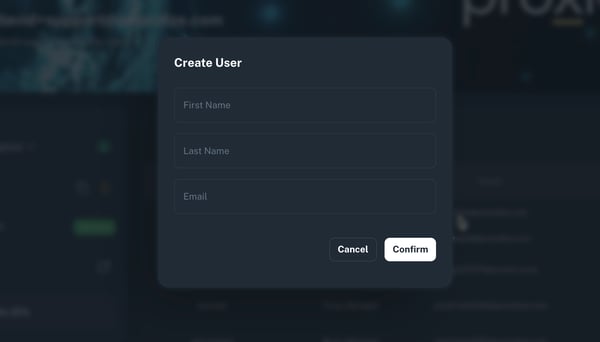
- Click on “Create User”
Step 2: Enter User Details
- Fill in:
- First Name
- Last Name
- Email Address
- Click “Confirm”
What Happens Next (For the Sub-User):
Once the user is added:
- The user should go to the login page and enter their email address
- They will receive a 6-digit verification code via email
- Enter the code to log in
First-Time Setup
After logging in, the user will need to:
- Complete their profile:
- First Name
- Last Name
- Account Type
- Organization details (if applicable)
- Accept all license agreements
Best Practices
- Use Sub-Accounts to assign responsibilities across your team (e.g., monitoring, maintenance)
- Ensure each team member uses their own email for accountability
- Use email-based alerts effectively when managing Proxy Builder setups
Need Help?
If you have any questions, concerns, or need further clarification, feel free to reach out to us via live chat or email us directly at support@proxidize.com.