
Host Settings is found below Activity Logs in the left sidebar of your Cloud Dashboard. Use the host selector at the top to switch between hosts. The Host tab is the third of three tabs, see also Proxy Tab and Proxy Rotation Tab.
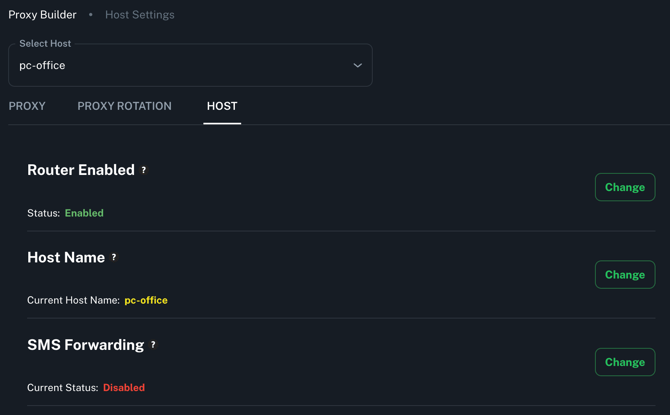
The Host tab covers host-level configuration that affects how your server operates as a whole, from enabling the Cloud Router and customizing network parameters, to rebooting the host and generating remote support sessions. Most settings in this tab are exclusive to Linux Agent hosts. Android Agent hosts have access to Host Name only. Full details for each setting are covered below.
Tip: Most settings have a (?) tooltip, hover over it for a quick description without leaving the page.
| Setting | Linux Agent | Android Agent |
|---|---|---|
| Router Enabled | ✅ | ❌ |
| Host Name | ✅ | ✅ |
| SMS Forwarding | ✅ | ❌ |
| Device TTL | ✅ | ❌ |
| Device MTU | ✅ | ❌ |
| Passive OS Spoofing | ✅ | ❌ |
| Reboot | ✅ | ❌ |
| Generate Remote Support Session | ✅ | ❌ |
| Generate System Report | ✅ | ❌ |
Router Enabled
Available on: All plans — Linux Agent only
Enables the Proxidize Cloud Router, which handles proxy port forwarding automatically. When enabled, ports are assigned by the router. When disabled, ports follow sequential assignment starting from the Proxy Start Port value.
Proxy speed is capped based on your plan:
| Plan | Speed Cap |
|---|---|
| Free | Up to 5 Mbps |
| Personal | Up to 25 Mbps |
| Business | Up to 100 Mbps |
Host Name
Available on: Business plan — Linux and Android Agent
Sets a custom nickname for this host to help identify it across the dashboard.

SMS Forwarding
Available on: Business plan — Linux Agent only
Enables SMS forwarding for this host, allowing incoming SMS messages to be sent as webhook calls to an external URL. Must be enabled here before forwarding rules can be created.
→ See the full SMS article for setup details.
Device TTL and MTU (Advanced)
Available on: Business plan — Linux Agent only
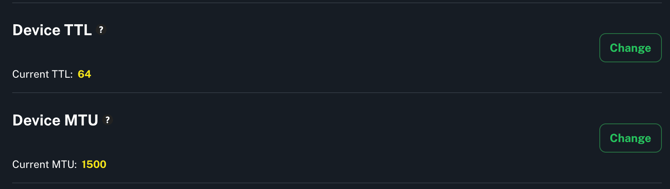
TTL (Time to Live) defines how long a data packet remains valid before being discarded in transit. The current value is displayed next to this setting and can be changed using the Change button.
MTU (Maximum Transmission Unit) sets the largest packet size that can be transmitted over your network, measured in bytes. The current value is also displayed next to this setting and can be changed using the Change button.
Passive OS Spoofing
Available on: Business plan — Linux Agent only
Changes the OS fingerprint your proxies present to target servers. By default proxies appear to run Linux. You can change the fingerprint to better blend traffic with typical user behavior.

Available OS fingerprints: Windows, Windows XP, Linux, Android, iOS, macOS
Reboot
Available on: Business plan — Linux Agent only
Remotely reboots the entire host. All endpoints on this host will be temporarily disconnected until the host comes back online.
Generate Remote Support Session
Available on: All plans — Linux Agent only
Generates a secure SSH session allowing the Proxidize support team to remotely access and troubleshoot your host. Each session has an expiration date, expired sessions can no longer be used to connect.
Generate System Report
Available on: All plans — Linux Agent only
Generates a full system diagnostic report for this host. Useful for troubleshooting and sharing with the support team when investigating issues.
Need Help?
If you have any questions, concerns, or need further clarification, feel free to reach out to us via live chat or email us directly at support@proxidize.com.