
You can cancel an active Proxidize subscription directly from the Subscriptions page in the Proxidize app.
When you cancel a subscription, it will remain active until the end of the current billing period. After that, it will not renew.
Before you start
Log in to your Proxidize account at:
Then click your profile at the top right corner and choose Billing.
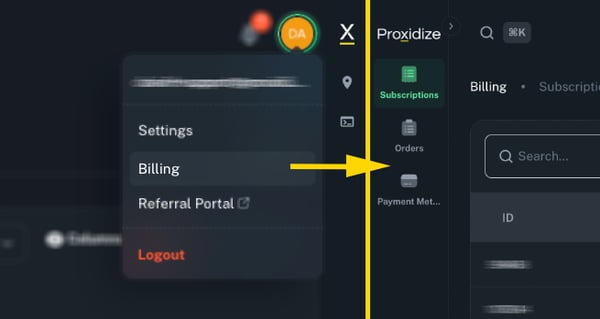
Cancel your subscription
- From the left sidebar, click Subscriptions.
- Find the subscription you want to cancel.
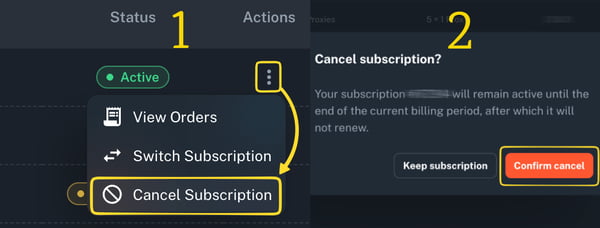
- Click the three-dot menu under the Actions column.
- Click Cancel Subscription.
- A confirmation window will appear.
- Click Confirm cancel to confirm the cancellation.
After confirming, the subscription status will change to Pending Cancel.
What happens after cancellation?
After cancelling your subscription:
- Your subscription will remain active until the end of the current billing period.
- You will keep access to your proxies until the next billing date.
- The subscription will not renew after the current billing period ends.
- The subscription status will show as Pending Cancel until cancellation is completed.
Note: Cancelling a subscription stops the next renewal. It does not immediately remove access to your proxies.
Can I reactivate a cancelled subscription?
If your subscription is still marked as Pending Cancel, you can reactivate it before the current billing period ends.
To reactivate it:
- Go to Subscriptions.
- Find the subscription marked as Pending Cancel.
- Click the three-dot menu under the Actions column.
- Click Reactivate Subscription.
Once reactivated, the subscription will continue as normal.
Related Articles:
- How to Manage Your Subscription in the Proxidize App
- Can I Buy Multiple Subscriptions on One Account?
- How to Upgrade, Downgrade, or Change Your Subscription
Need Help?
If you have any questions, concerns, or need further clarification, feel free to reach out to us via live chat or email us directly at support@proxidize.com.