
What Is the Proxidize API?
The Proxidize API is a REST API that lets you connect your own tools, scripts, or applications to your Proxidize account.
You can use the API to automate common proxy management tasks instead of making every change manually from the dashboard.
For full endpoint documentation, request examples, response examples, and technical usage details, use the:
Proxidize Developer Docs.
When to Use the API
Use the API when you want to:
- Automate proxy management.
- Do Bulk operations on your proxies.
- Connect Proxidize with an internal tool or workflow.
- Retrieve proxy or account information programmatically.
- Manage IP whitelisting for supported plans.
- Look up available proxy locations and carriers.
- Rotate or update proxies where supported by your plan.
- Manage access points for Per GB plans.
If you only need to make occasional changes, the Proxidize dashboard may be easier to use.
Before You Start
Make sure you have:
- A Proxidize account.
- Access to the Proxidize dashboard.
- Permission to view account settings.
- An API token from your account settings.
- An active product or plan for the API feature you want to use.
The API is available to all Proxidize customers, but the features you can use depend on your active plan.
API Base URL
The Proxidize API base URL is:
https://api.proxidize.com/api/v1
All REST API endpoints in the developer documentation use this base URL.
Get Your API Token
The API uses bearer token authentication.
To copy your API token:
- Log in to the Proxidize dashboard.
- Go to app.proxidize.com/settings.
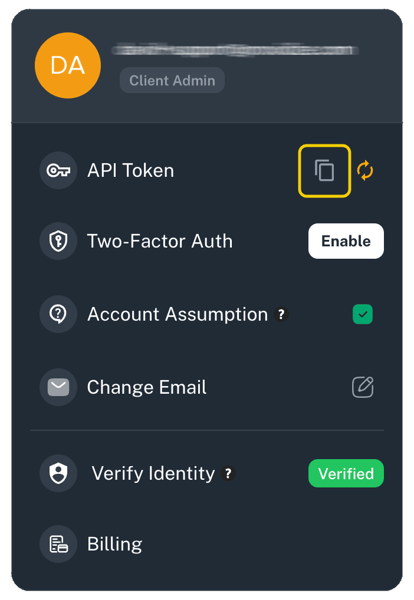
- Find the API Token field.
- Click the copy button next to API Token.
- Use this token as a bearer token when making API requests.
⚠️ Important: Keep your API token private. Anyone with access to your token may be able to make API requests for your account.
Rotate Your API Token
If your API token is exposed, shared by mistake, or used in a system you no longer trust, rotate it from your account settings.
To rotate your API token:
- Go to app.proxidize.com/settings.
- Find the API Token field.
- Click the rotate button next to the copy button.
- Update any scripts, applications, or integrations that were using the old token.
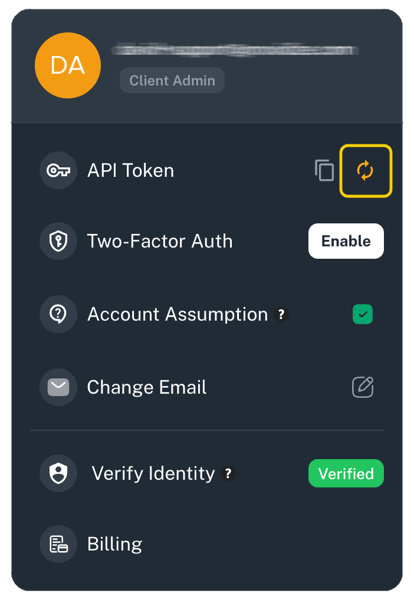
💡Note: Rotating the token invalidates the previous token. Any integration still using the old token may stop working until it is updated.
API Features by Plan
API features are separated by product type. An endpoint for one plan may not work with another plan.
| Plan/API Area | Available API Features |
|---|---|
| Per Proxy Mobile Proxies | View proxies, view single proxy details, manage IP whitelisting, look up locations and carriers, rotate proxies, use rotation URLs, update proxy passwords, set rotation intervals, and manage proxy session tags. |
| Per GB Mobile Proxies | View user information, view and manage settings, create and manage access points, manage IP whitelisting, and look up available mobile locations and carriers. |
| Per GB Residential Proxies |
For exact endpoint paths, request bodies, response formats, and examples, use the relevant developer documentation section:
Per Proxy Mobile API
Use the Per Proxy Mobile API when you want to manage individual mobile proxy sessions.
Depending on your subscription, this API can help you:
- Retrieve proxy lists and proxy details.
- Rotate a proxy.
- Use a rotation URL.
- Update a proxy password.
- Set a rotation interval.
- Manage IP whitelisting.
- Look up available locations and carriers.
- Create, delete, assign, and remove tags from proxy sessions.
💡Note: Per Proxy features are different from Per GB features. For example, proxy rotation and proxy session tags are Per Proxy Mobile features.
Per GB Mobile/Residential API
Use the Per GB Mobile/Residential API when you want to manage Per GB mobile proxy access.
Depending on your subscription, this API can help you:
- View user information.
- View and manage settings.
- Create and manage access points.
- Manage IP whitelisting.
- Look up available mobile locations and carriers.
💡Note: Per GB access is usually managed through access points and whitelisted source IPs rather than individual proxy sessions.
Important Notes
- Keep your API token private.
- Rotate your API token if it is exposed.
- API features depend on your active Proxidize plan.
- Per Proxy endpoints and Per GB endpoints are not interchangeable.
- Some actions may affect active integrations, scripts, or proxy access.
- Use the GitBook developer documentation for exact endpoint usage and examples.
Troubleshooting
| Issue | What to Check |
|---|---|
| API requests are unauthorized | Confirm you are using the correct bearer token from account settings. |
| An integration stopped working after token rotation | Update the integration with the new API token. |
| An endpoint does not work for your account | Confirm your active plan supports that API feature. |
| A Per Proxy endpoint does not work for a Per GB plan | Use the API section that matches your product type. |
| Location or carrier filters do not work | Use the lookup endpoints in the developer docs to confirm valid values. |
| IP whitelisting does not allow access | Confirm the whitelisted IP is the source IP your requests are coming from. |
Related Articles
- Proxidize Developer Docs: REST API Reference
- Per Proxy Mobile Proxies API
- Per GB Mobile Proxies API
- Per GB Residential Proxies API
Need Help?
If you have any questions, concerns, or need further clarification, feel free to reach out to us via live chat or email us directly at support@proxidize.com.