
Proxy Pooling allows you to combine multiple mobile proxies into one single proxy endpoint.
Instead of connecting to each proxy individually, your traffic is automatically distributed across all available proxies in the pool. Proxy Pooling is available for Per-Proxy plans and supports both HTTP and SOCKS5 proxies.
How Proxy Pooling Works
- All active proxies are grouped into a shared pool
- All proxies in the pool use the same username and password
- Traffic is evenly distributed across all available proxies
Proxy Assignment Logic
-
Each new request is sent to the next available proxy in the pool
-
Proxies are used sequentially to ensure even distribution
-
If a proxy becomes unavailable (expired, removed, or downgraded), it is immediately excluded from the pool and no longer receives traffic
-
The behavior of the pool depends on the total number of active proxies available
Stickiness
Proxy Pooling allows you to control how requests are routed using stickiness.
Randomize IP
-
Each request is routed through a different proxy/IP
-
Uses round-robin rotation by default
-
Best for scraping, automation, and high-volume requests
Note: Randomize IP does not use sessions.
Sticky IP
-
Requests stay on the same proxy/IP for the duration of the session
- If the number of sessions exceeds the number of available proxies in your plan, IPs will be duplicated because sessions cycle back to the first proxy and continue the round-robin assignment.
- You have the option to refresh the session ID. This will generate new proxy credentials, refresh the proxy, which then maintains a static IP address.
-
Best for logins, account-based workflows, or longer sessions
Note: Sticky IP requires a session identifier added after -p-default.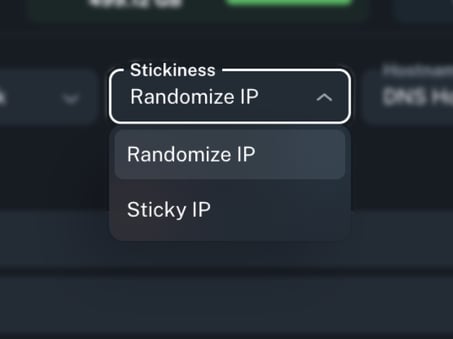

Proxy Pool Test Example
Use the following command to test the proxy pool using Sticky IP or Randomize IP behavior.
The command sends 10 requests through the same proxy endpoint and returns the IP address used for each request.
-
Sticky IP: All requests return the same IP
-
Randomize IP: Each request returns a different IP from the available pool
Command
proxy="ip:port:username:password"

host=$(echo "$proxy" | cut -d: -f1)

port=$(echo "$proxy" | cut -d: -f2)

user=$(echo "$proxy" | cut -d: -f3)

pass=$(echo "$proxy" | cut -d: -f4)

echo "Test IPs  :"

echo "$proxy"

echo "----------------------------------------"


for i in {1..10}; do

  ip=$(curl -s --max-time 20 --proxy "http://$user:$pass@$host:$port" https://api.ipify.org || echo "FAILED")

  echo "Request $i -> $ip"

  sleep 1

done
Replace ip:port:username:password with your actual proxy credentials from the dashboard.
Output:
Test IPs:

ip:port:username:password

----------------------------------------

Request 1 -> 34.123.45.67

Request 2 -> 34.123.45.89

Request 3 -> 34.123.45.102

Request 4 -> 34.123.45.67

Request 5 -> 34.123.45.131

...

Request 10 -> 34.123.45.77
This confirms that each request is routed through a different proxy if Randomize IP is being used, and all requests are routed to the same proxy in case of using Sticky IP
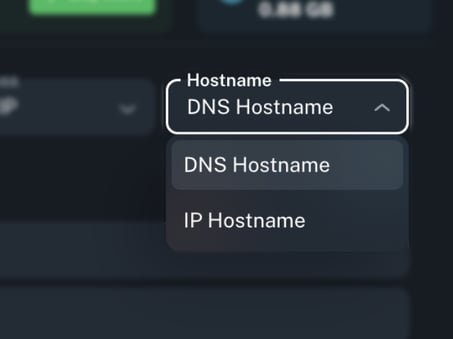
Hostname Type Selection
Control how your proxies are resolved:
-
IP Hostname: Direct IP
- DNS Hostname: Dynamic domain
Live Proxy Credential Generation
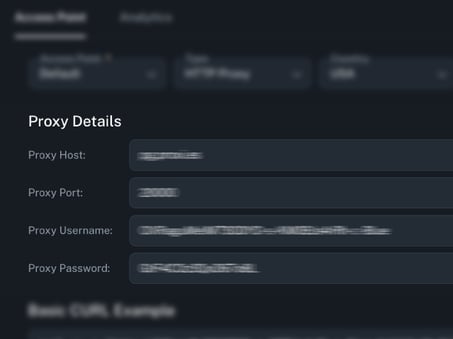
Proxidize automatically generates proxy credentials in real time, allowing you to access your mobile proxies immediately after setup — no manual configuration required.
Each proxy comes with the following connection details:
-
Host (IP or DNS): The IP address or domain name assigned to your proxy.
-
Port: The unique port number corresponding to the specific proxy.
-
Username: A system-generated username used for authentication.
-
Password: Secure, customizable password for enhanced access control.
These credentials can be used directly in your proxy client, browser, or third-party tools that support HTTP(S) or SOCKS5 protocols.
Basic CURL Example (Auto-Generated)
To help you test your proxy setup instantly, Proxidize displays a pre-filled CURL command based on your selected protocol (HTTP or SOCKS5). This command includes your proxy host, port, and credentials, making it easy to verify functionality from the command line.
You can:
-
Copy and paste the command into your terminal for quick testing.
-
Switch protocols to auto-generate a cURL snippet that matches your chosen settings.
-
Use the example as a template when integrating proxies into scripts or tools.
This feature is especially useful for troubleshooting or verifying proxy connectivity without needing additional software.

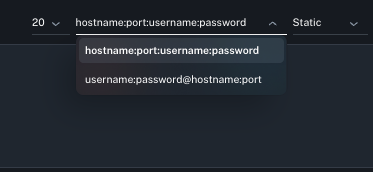
Formatted Proxy List Generator
Export your proxies in your preferred format:
-
hostname:port:username:password -
username:password@hostname:port
Choose from batch sizes of 10, 20, 50, or 100 proxies—and generate unlimited lists as needed.
Port Mapping
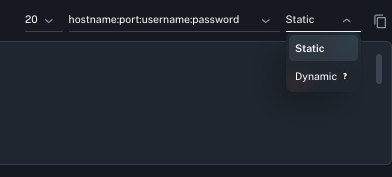
Port Mapping lets you control how ports are assigned to your proxy list. You can use the same port for all proxies or assign unique ports to each proxy.
Static
Uses the same port for all proxies.
HTTP: 20000
SOCKS5: 20002
Dynamic
Each proxy is assigned its own HTTP and SOCKS5 ports, which are shown on the dashboard. Port ordering is standardized for easier review.
HTTP range: 18000 → 20000
SOCKS5 range: 20002 → 22002
Where to Manage Proxy Pooling
You can configure and access Proxy Pooling from your dashboard:
👉 https://www.app.proxidize.com/proxies/mobile/pooling/
From there, you can:
- Choose HTTP or SOCKS5
- Set stickiness behavior
- View pool credentials
- Copy ready-to-use proxy connection details