
Available on: Business plan only Supported hosts: Linux-based hosts only (SX2, SX4, Ubuntu, Raspberry Pi)
Overview
Proxy Pools let you group multiple endpoints under a single proxy address. Instead of connecting to individual proxies, all traffic is routed through the pool and distributed across the selected endpoints automatically. This is useful for increasing throughput and avoiding overloading a single connection.
Load Balancing Methods
When creating a pool, you choose how incoming requests are distributed across endpoints:
| Method | Behavior |
|---|---|
| Round Robin | Requests are distributed randomly across all selected endpoints |
| Least Connection | All requests are routed to one endpoint until it becomes overloaded, then spills over to the next |
Creating a Proxy Pool
Go to Proxies → Proxy Pools and click Create Proxy Pool. Fill in the following fields:
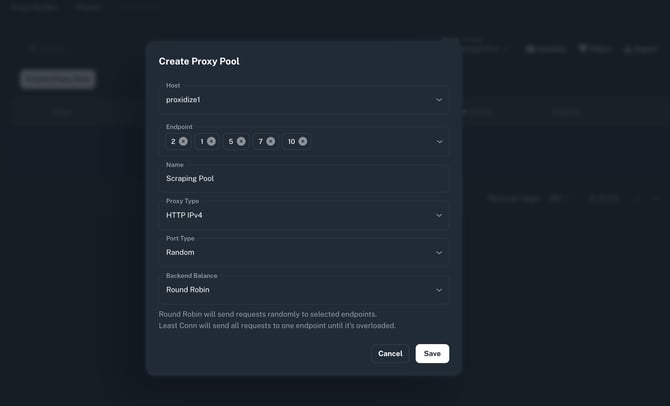
Host Select the host containing the endpoints you want to include in the pool.
Endpoints Select one or more endpoints from the chosen host to include in the pool. You can add as many endpoints as needed.
Name Give the pool a descriptive name to identify it in the table.
Proxy Type Choose the proxy protocol for the pool:
- HTTP IPv4
- HTTP IPv6
Port Type Choose how the pool's port is assigned:
- Random — a random available port is assigned automatically
- Random with Range — a random port is assigned within a specified range
- Manual — you specify the port number directly
Backend Balance Select the load balancing method: Round Robin or Least Connection.
Once configured, click Save. The pool will appear in the Proxy Pools table with its name, pool type, host, proxy address, balance method, and the endpoints included.
Managing Proxy Pools
From the Proxy Pools table you can:
- Edit an existing pool to update its endpoints, type, or balance method
- Filter pools by host
- Export the table as a CSV
Need Help?
If you have any questions, concerns, or need further clarification, feel free to reach out to us via live chat or email us directly at support@proxidize.com.