
Host Settings is found below Activity Logs in the left sidebar of your Cloud Dashboard. Use the host selector at the top to switch between hosts. The Proxy Rotation tab is the second of three tabs — see also Proxy Tab and Host Tab.
Tip: Most settings have a (?) tooltip, hover over it for a quick description without leaving the page.
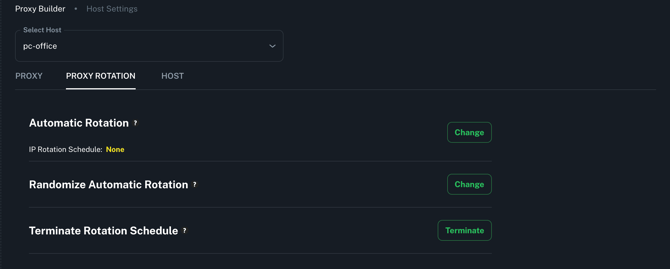
The Proxy Rotation tab controls how and when your endpoints automatically rotate their IPs at the host level.
Both Linux and Android Agent hosts support automatic rotation and the ability to terminate an active schedule. Linux Agent hosts additionally support randomized rotation intervals for less predictable rotation patterns.
The compatibility table below shows what's available on each agent type, and full details for every setting are covered further down the page.
| Setting | Linux Agent | Android Agent |
|---|---|---|
| Automatic Rotation | ✅ | ✅ |
| Randomized Automatic Rotation | ✅ | ❌ |
| Terminate Rotation Schedule | ✅ | ✅ |
Automatic Rotation
Available on: Personal and Business plans — Linux and Android Agent
Sets a host-wide automatic IP rotation schedule. All endpoints on this host rotate at the chosen interval. The interval can be set in minutes, hours, or days.
Randomized Automatic Rotation
Available on: Business plan — Linux Agent only
Instead of rotating at a fixed interval, this randomizes the rotation timing across your chosen range. Options include randomizing by minutes, hours, days, or fully randomizing both the period and interval values. Useful for making rotation patterns less predictable.
Terminate Rotation Schedule
Available on: Personal and Business plans — Linux and Android Agent
Cancels any active automatic rotation schedule on this host without setting a new one.
Need Help?
If you have any questions, concerns, or need further clarification, feel free to reach out to us via live chat or email us directly at support@proxidize.com.