
You can download invoices for your Proxidize orders directly from the Proxidize app.
Invoices are available from the order history connected to your subscription which you can access from the Orders section in the app.
Before you start
Access the billing section by Logging into your Proxidize account at:
Then click your profile at the top right corner and choose Billing.
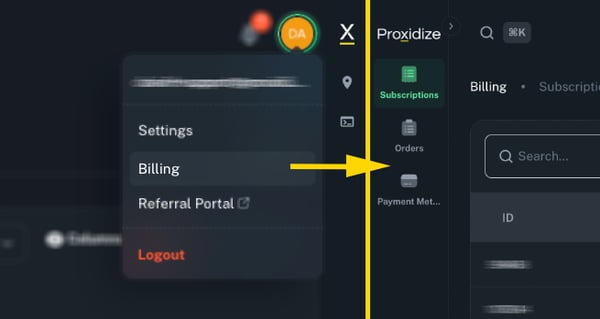
Download an invoice from the Orders page
- From the left sidebar, click Orders.
- Find the order you want to download the invoice for.
- In the Actions column, click PDF.
- Your invoice will be downloaded as a PDF file.
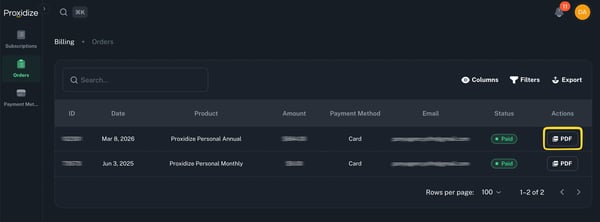
When is an invoice available?
Invoices are usually available after an order or subscription payment is completed.
If the order payment is still pending or failed, the invoice may not be available until the payment is successfully completed.
What to do if you cannot find your invoice
If you cannot find or download your invoice, contact Proxidize Support and include the following details:
| Detail | What to provide |
|---|---|
| Account email | The email address on your Proxidize account |
| Order ID | The order ID shown on the Orders page |
| Subscription ID | The subscription ID, if the order is related to a subscription |
| Payment date | The date the payment was made |
Providing these details helps our team locate the invoice faster.
Related Articles:
- How to Manage Your Subscription in the Proxidize App
- How to Pay After a Failed Payment
- How to Subscribe to a Proxidize Plan
Need Help?
If you have any questions, concerns, or need further clarification, feel free to reach out to us via live chat or email us directly at support@proxidize.com.