
If a subscription payment fails, the subscription may be placed On Hold.
You can complete the payment from the Subscriptions page or by paying the related order from the Orders page.
💡 Note: Proxidize provides a 5-day grace period after a failed payment. If the payment is not completed within this period, access to your proxies will be lost. Once the payment is completed, proxy access will be restored.
Before you start
Log in to your Proxidize account at:
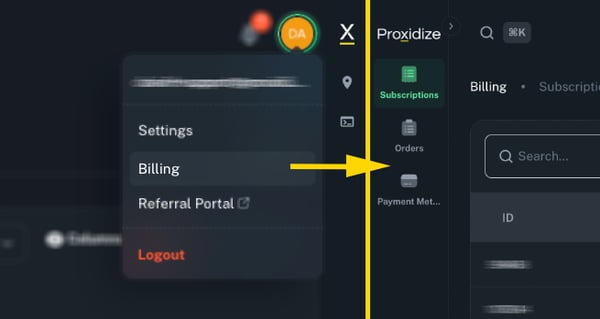
Then click your profile at the top right corner and choose Billing.
Method 1: Renew from the Subscriptions page
Use this method if your subscription is marked as On Hold.
- From the left sidebar, click Subscriptions.
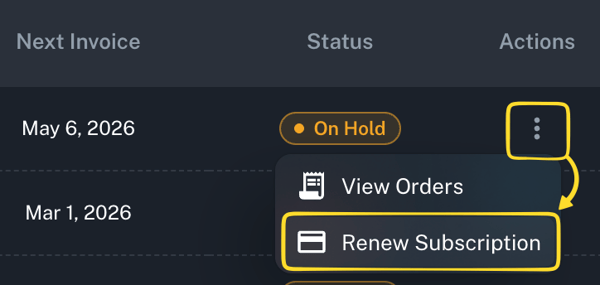
- Find the subscription with the On Hold status.
- Click the three-dot menu under the Actions column.
- Click Renew Subscription.
- Complete the payment.
After the payment is completed, your subscription should become active again and access to your proxies will be restored.
Method 2: Pay from the Orders page
You can also pay directly from the related order.
- From the left sidebar, click Orders.
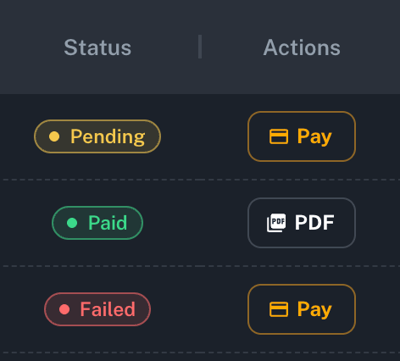
- Find the order with a Pending or Failed status.
- In the Actions column, click Pay.
- Complete the payment.
After the payment is completed, the order status should update to Paid, and the related subscription should be restored.
What happens after payment is completed?
After the payment is successfully completed:
- The related order should update to Paid
- The subscription should become active again
- Access to your proxies will be restored
Note: If your payment was completed but your subscription or proxies were not restored, contact Proxidize Support before trying to pay again.
What if the payment fails again?
If the payment does not go through, check that your payment method is valid and has enough funds available.
You can also update your payment method from the Proxidize app and try again.
Related articles:
- How to Change Your Payment Method
- How to Manage Your Subscription in the Proxidize App
- How to Download an Invoice
Need Help?
If you have any questions, concerns, or need further clarification, feel free to reach out to us via live chat or email us directly at support@proxidize.com.